Cursor's monthly quota: know if your usage will last, without the math — why I built Usage Pacer
Unlike ChatGPT, Cursor's subscription is a monthly pool. Managing how you spend that pool is quietly tricky. A Chrome extension that compares time elapsed with usage, so you can see at a glance whether your pace will hold until the reset.
When you use a Cursor subscription, there’s always that question in the back of your mind: “At this pace, will my quota last the month?”
The amount you can use resets every month, so overspending and underspending both feel like a waste. But the dashboard only shows how much you’ve used — it doesn’t tell you whether your current pace will hold until the reset.
I built Usage Pacer to remove that mental arithmetic.
ChatGPT and Cursor consume subscriptions differently
The starting point was the difference between ChatGPT and Cursor subscriptions.
ChatGPT-style plans reset on a short cycle. Even if you overspend, the quota comes back in a few days. You rarely need to manage your usage rate carefully.
Cursor, on the other hand, is a monthly pool. You have to manage how you allocate that pool yourself. That means you need to know, fairly precisely, how much you’ve used and whether your current pace will last until the end of the month.
| Reset cycle | Management needed | |
|---|---|---|
| ChatGPT-style | Short (days to weeks) | Barely any |
| Cursor | Monthly pool | Pace management is essential |
That difference was the direct motivation for building this extension.
What Usage Pacer does
It shows two numbers and compares them. That’s it.
- ELAPSED: how far into the month you are, by time
- USED: how much of the quota you’ve actually used
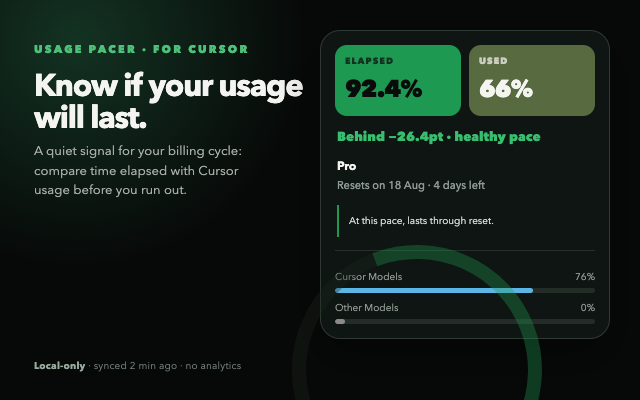
Putting these two side by side makes the pace obvious at a glance.
- 50% elapsed but 80% used → you’ll run out before the reset
- 50% elapsed but 30% used → you have room — use more
In the screenshot example, it’s 92.4% elapsed against 66% used. The extension shows Behind -26.4pt · healthy pace and even forecasts that the quota will last until the reset.
Implementation notes
- Reuses your existing Cursor session: it simply calls the usage-summary API with your logged-in cursor.com session. No extra login or token management needed.
- Local-only: no backend, no analytics. The usage snapshot lives in Chrome’s local storage.
- Small MV3 + React setup: just a popup and a toolbar badge.
One side note on privacy: reading an existing session is exactly the kind of behavior that makes the Chrome Web Store require a privacy policy, so that was handled properly before publishing.
Summary
Subscriptions like Cursor’s aren’t “the more you use, the better” — the real game is managing how you spend a monthly pool.
Usage Pacer is a small tool that shows you the one thing you need for that management — whether your current pace will last — without any calculation. If you use Cursor and worry about your monthly quota, give it a try.
Related: I built Cycle Counter from a similar motivation: making periodic numbers visible without mental math.